We built 5000+ browser agents
In the last month we ran over 100,000 executions, 600,000 browser and computer minutes, and reached 5,000 browser and computer use agents built on Asteroid. Some run for up to an hour, most are core parts of critical pipelines in healthcare and insurance, and some have zero tolerance for failure yet run thousands of times a week.
One customer replaced ~100 offshore workers (with poor reliability, low quality work, and an inability to scale) with 6 agents. Each run takes 17 minutes on average, some run more than 1,000 times a day, and their agent instruction set contains over 8,000 words.
We’ve spent thousands of hours with customers building agents like this. I wanted to share the journey developers and non-technical ops people go through, and how to think about it better.
Over the past 4 months we redesigned our harness to support the hardest use cases. Our new harness is a coding agent with browser tools and a full filesystem. The filesystem persists scripts and markdown files across executions so the agent learns over time. The agent runs as a workflow of nodes, each with semi-separate context, giving you scalability and guardrails.
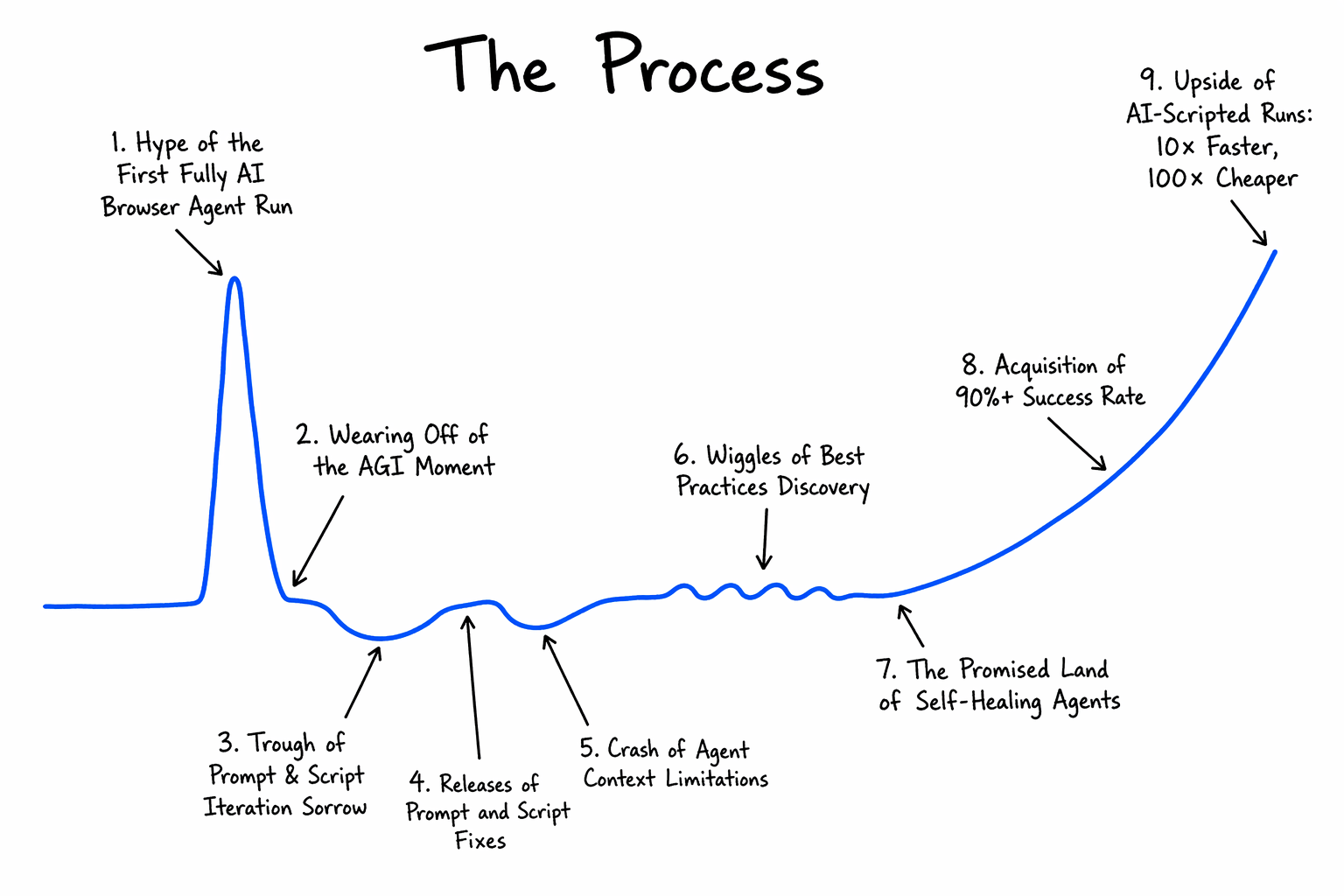
The Process
So why is building browser agents hard, and how do you do it methodically better?
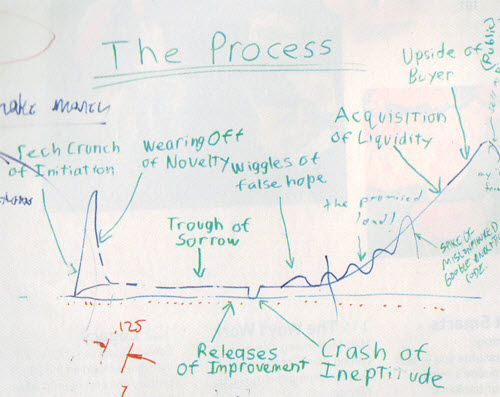
Paul Graham’s startup process graph [1] illustrates the agent developer journey extremely well. We just had to update a few annotations to reflect our experience.
In short: you build the agent with AI assistance and hit the happy path quickly. Then edge cases emerge, scripts are introduced, and the difficulty compounds. Getting the agent into production is a long and non-linear process. Some teams ship. Many do not.
As an example use case, think of a user trying to build an agent that goes to a browser portal, logs in, and fills a fairly complex branching form.
Browser agent building phases
1. Hype of the First Fully AI Browser Agent Run
The agent completes the task from a basic prompt. A few small errors, but a quick correction and it works end-to-end. It is slow and expensive, but both seem fixable. The results feel like a transformative moment.
What’s actually happening: you’re on the happy path. Edge cases don’t exist yet.
2. Reality Sets In
Script the deterministic parts to improve speed and reliability.
Now it is fast, but it is entering incorrect data. Edge cases missed during initial testing surface, model assumptions prove wrong, and the errors are severe enough to be catastrophic in production. The prompt needs work.
Lesson: speed reveals correctness problems. Don’t optimize before you’re right.
3. Trough of Prompt & Script Iteration Sorrow
Update the prompt, update a script, and something that was working breaks. The agent misses a checkbox that was not explicitly specified. Progress is inconsistent.
Lesson: iterating on a monolithic prompt and script together is the root cause of this cycle. Decompose first.
4. Releases of Prompt and Script Fixes
All context is consolidated into one prompt, stitched together with Playwright snippets and tested locally.
This feels like progress. It’s not. You’re building technical debt.
5. Crash of Agent Context Limitations
Models are trained on goals, not granular instructions. They make assumptions when underdirected. At context limit they hallucinate. They’re incredible at writing scripts, but only when they have the full DOM, selectors, and examples of what worked and didn’t. Without that, they write brittle scripts with no branching.
Lesson: the model isn’t the problem. Missing context of previous executions is.
6. Wiggles of Best Practices Discovery
This is where builders who ship live. The key shifts:
- Decompose into a node graph. Most agents are actually workflows, less glamorous, but it works. Split into nodes with clean context per step. For example 2 agentic nodes (e.g. login, fill form) and 1 output node. Each node is independently debuggable.
- Define outcomes, not just instructions. Give 2 to 10 explicit outcome labels:
form_submitted,user_not_found,login_failed,other_error. This tells you what the agent actually did, not just whether it crashed. - Write outcome-oriented prompts.
- Good: “Fill the patient intake form with
{{.DATA}}. If a required field is missing, returnmissing_field. If a validation error appears, retry once, then returnvalidation_error.” - Bad: “Click
button.btn-primary…” Hardcoded selectors break when the DOM changes.
- Good: “Fill the patient intake form with
- Don’t constrain the agent’s tools. We’ve seen agents reverse engineer backend APIs, build a skill from that, and run 1000x faster than the frontend equivalent. A rigid prompt would never let this happen.
- Feed previous execution context offline. When iterating between runs, give the agent what worked and what didn’t. It dramatically reduces regression.
7. The Promised Land of Self-Healing Agents
- Self-healing scripts. The agent correctly uses scripts for deterministic subtasks.
- Lock scripts once they work. Define explicit failure handling (e.g. cancel the run deterministically). No manual intervention required.
8. Acquisition of 90%+ Success Rate
The agent handles all input variations and correctly fails on unspecified situations. It knows what it doesn’t know.
9. Upside of AI-Scripted Runs at 10x Speed, 100x Cost
What took 30 minutes now takes 5, with far fewer LLM calls. Thousands of runs a day. This is the compounding payoff for doing steps 6 and 7 properly. Getting here is still not possible for any browser workflow. It only became possible with Claude 4.5+ level models.
Examples of Underspecified Prompts
To illustrate how challenging some customer requests can be, here are a few real prompts, simplified to preserve anonymity:
- “Don’t make mistakes.”
- “Sign in, extract all data from the CRM for the past 20 years, do it in 4 minutes.”
- “Open 10 browser tabs at the same time, change IP address for each, and sign into these 10 portals.”
Each reflects a genuine misunderstanding of fundamental agent constraints.
How to think about building browser agents
Even as coding agents improve, the agent builder who understands the process will remain essential. The development time will get compressed into shorter cycles with AI’s help.
[1] Paul Graham’s process graph, for reference.