
We’re building Asteroid to make browser automation accessible to everyone.
But automation has a pattern: everything starts simple, then it explodes. Edge cases pile up. Portals change. What begins as a quick workflow becomes a multi-step system that needs real engineering. So we built a workflow engine that scales from simple automations to real-world complexity. It is a visual graph of nodes, powered by prompts, tools, and guardrails. And it worked, for builders.
But the people who know these workflows best do not think in nodes and edges. They want to describe what should happen. The graph should be the output, not the interface. So we built Astro, Cursor for browser agents. It builds workflows, debugs failures, and iterates alongside you in plain English.
In this post, we share the technical details and lessons learned building Astro, including what failed, what worked, and why.
What is Astro?
Astro is an AI agent embedded in the Asteroid platform. You describe what you need:
I need an agent that logs into our HR portal, downloads the latest payroll report, and emails it to finance.
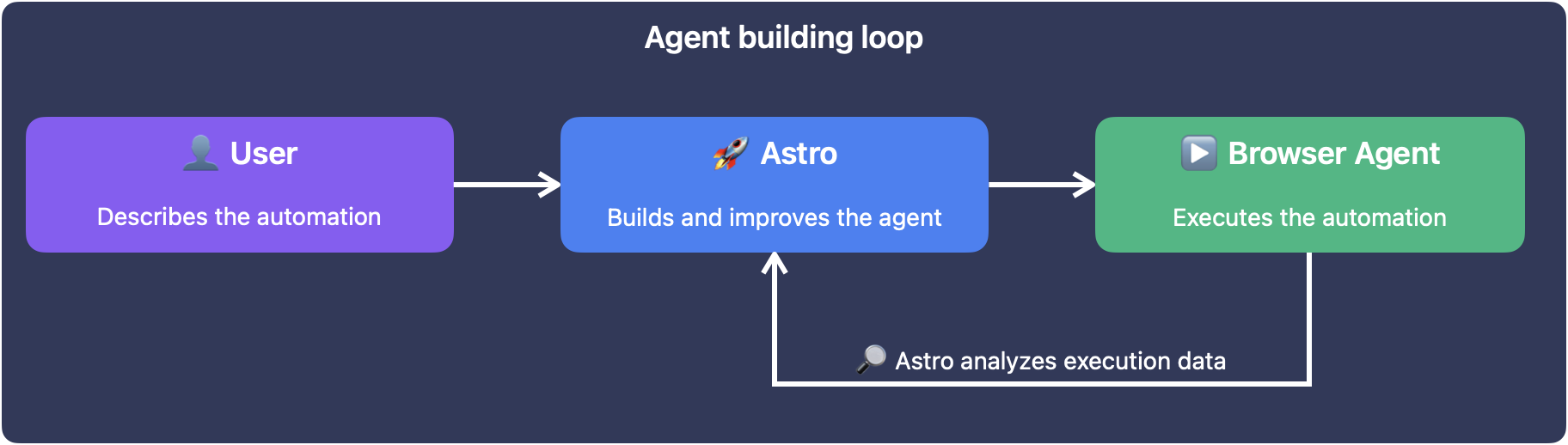
Astro builds the workflow, explains what it created, and refines based on your feedback.
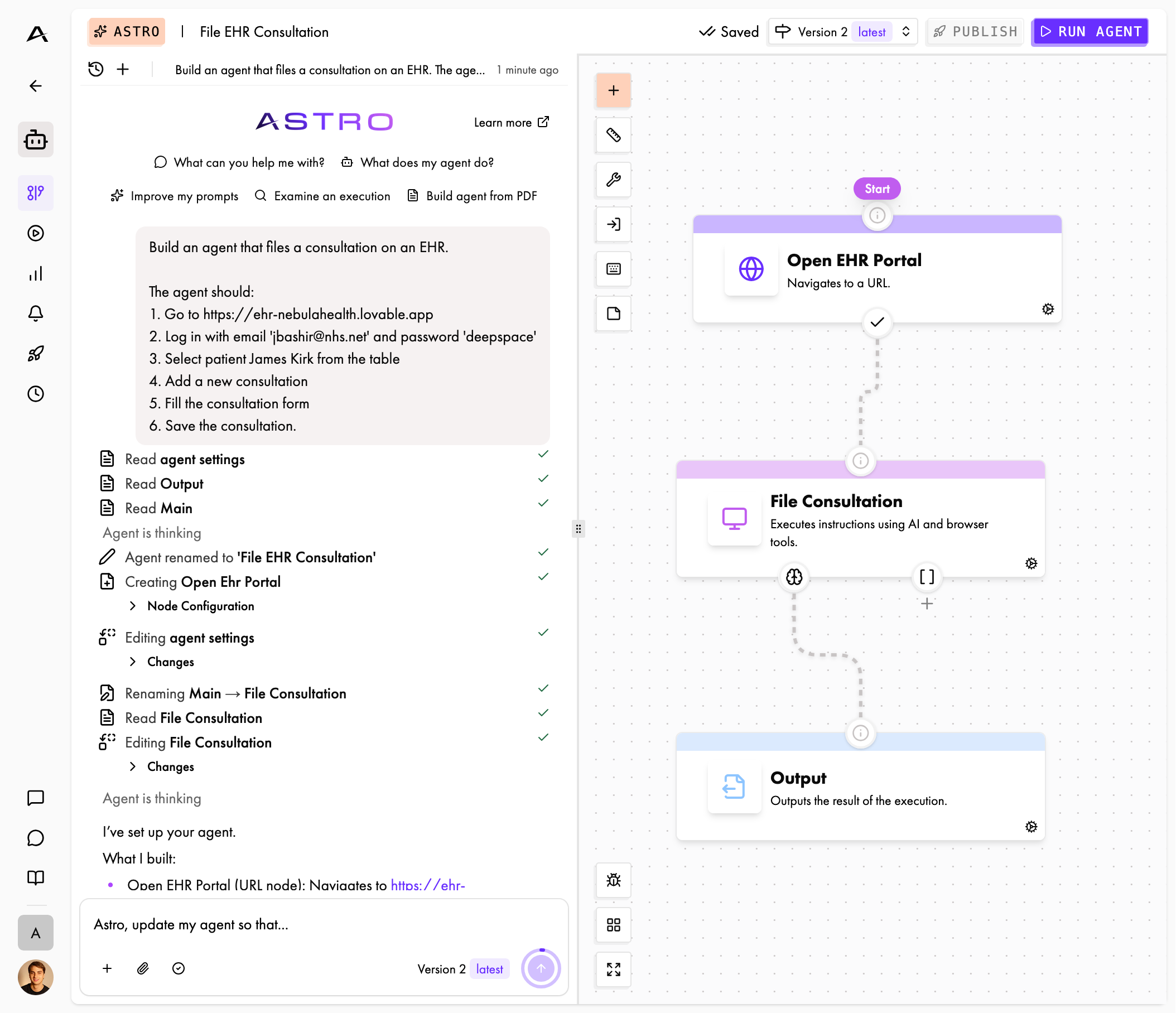
But building agents is only half of Astro’s story. Real process automation is inherently iterative: websites break, form requirements change, edge cases emerge. So Astro can also debug your executions. You can ask:
Why did yesterday’s execution fail?
Astro retrieves the execution details, traces through what happened, and explains:
The login succeeded, but the download button wasn’t found. The page structure may have changed. Here are the suggested updates to the agent…
We didn’t design Astro as a one-shot generator: it’s a collaborator that understands context, proposes changes, and adapts.
How we built Astro
Building Astro taught us more than we expected. Our first attempt was obvious in retrospect, and wrong. We gave the LLM tools that directly manipulated the graph:
add_node(name, type, properties)remove_node(id)add_transition(from, to, type, condition)update_node_properties(id, properties)
This seemed right, as these operations aligned directly to what needed to happen. The model could call add_node, then add_transition, and the graph would change.
However, we quickly found out that the model lost track: after five operations, it couldn’t reason about what the graph looked like anymore. There was no natural way to “read” the current state: we’d have to serialize and inject the entire graph after every change. The order dependence was brutal: you can’t add a transition before both nodes exist, but the model doesn’t naturally think in this dependency order.
Then we realized that Cursor doesn’t work this way either. It doesn’t give models add_function() and remove_line(), or insert_at_position() tools. It works with files. The model reads a file, and makes changes in context. So we asked ourselves: What if we treat the agent graph like a codebase?
Graphs as Files
We landed on a representation that distributes the graph information like this:
config.json         → Rules, settings, start node
nodes/
 login.json         → Node name, type, properties, transitions
 fill_form.json
 submit_and_confirm.json
Each node becomes a self-contained file:
{
 "name": "Login to Portal",
 "type": "ai",
 "properties": {
   "instructions": "Navigate to the login page and enter the provided credentials..."
 },
 "transitions": [
   { "to": "download_report", "type": "ai" }
 ]
}
As a result, we could align our tools closely with what coding agents already understand:
list_filesto see the workflow structureread_fileto inspect settings or a node’s full configurationadd_fileto create a new nodesearch_replaceto edit settings or node content (instructions, transitions, scripts)delete_fileto remove a noderename_fileto rename a nodesave_draftto validate and save the workflow as a draft
This unlocked Astro’s capabilities for three reasons.
- Familiar pattern. LLMs are trained extensively on code editing, not on graph manipulation. They know how to read a file, understand its structure, and make targeted changes. We’re leveraging thousands of hours of coding examples in their training data.
- Natural context. When Astro reads a node file, it gets the complete picture: the instructions, the transitions, and the rest of the node properties. No need to reconstruct a state from a sequence of operations, as information isn’t scattered in multiple places.
- Composable edits. search_replace handles everything from fixing a typo to rewriting an entire prompt. This single tool can be leveraged in different scopes, which significantly simplifies the tool choice for Astro.
Hiding Complexity
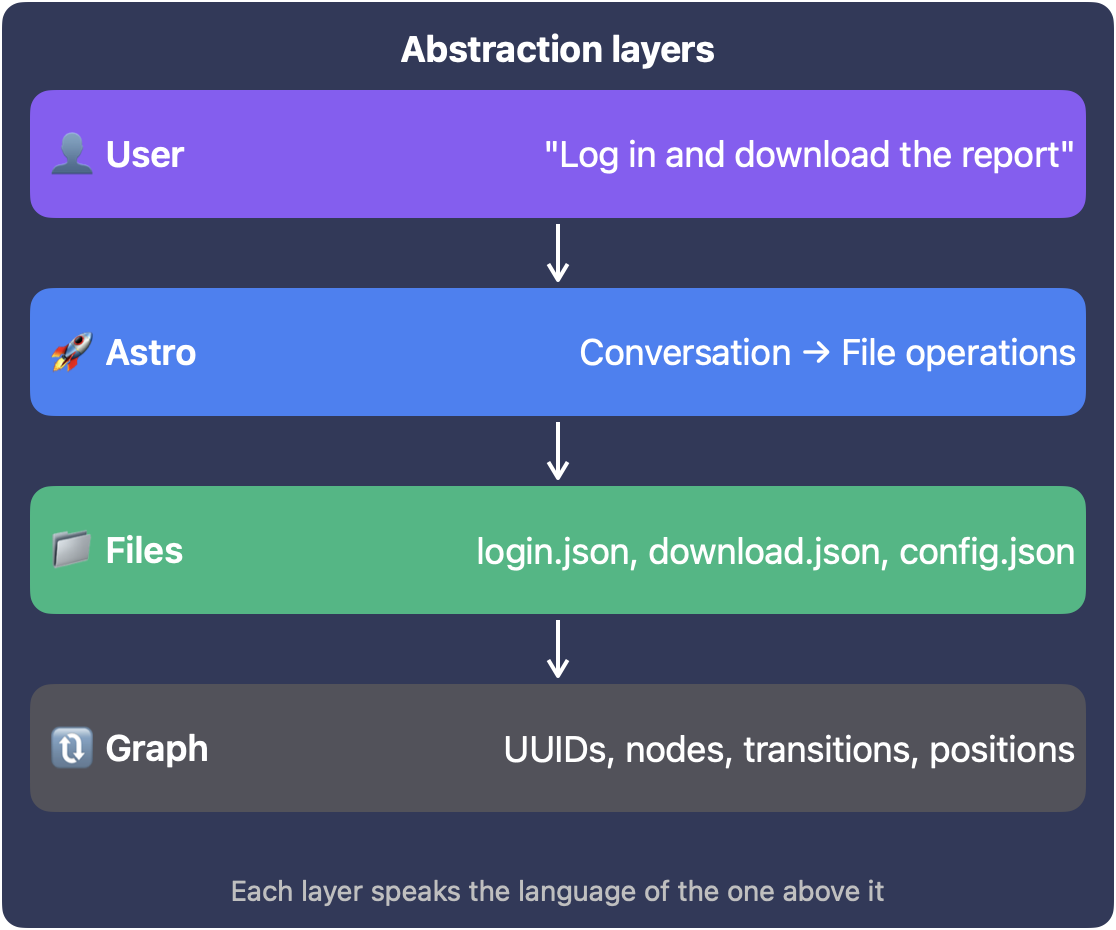
The file paradigm opened up another opportunity: we could shield the model from implementation details it didn’t need. Our backend uses UUIDs for everything: nodes, transitions, analytics, execution history. But UUIDs carry no semantic meaning, waste context, and make it harder for the model to reason about structure. So Astro never sees them.
When we convert the workflow to files, UUIDs become human-readable names: login.json, not 7f3a2b4c-1234-5678-abcd-ef0123456789.json. When Astro’s changes are committed, we convert back, preserving existing UUIDs where nodes still exist, generating new ones for new nodes.
This bidirectional mapping is invisible to Astro:
- New nodes get new UUIDs automatically
- Existing nodes keep their IDs (crucial for execution history and analytics)
- Renames update references everywhere
This lets Astro focus on meaning, not identifiers. When it sees a transition from login to dashboard it understands the flow. A transition from 7f3a2b4c... to 8e4d5f6a... would be noise.
Validation: Catching Mistakes Before They Ship
Even with deep knowledge of how Asteroid agents work, Astro operates with a large context and can still make mistakes. A transition might reference a node that doesn’t exist. The start node might be missing. An output schema might be malformed.
That’s why we added a save_draft tool that validates before saving. Just like codebases have linters, this tool lets Astro catch mistakes early, not in production.
When Astro finishes editing, validation runs automatically. If it fails, Astro gets the error message and retries. This self-correction loop is crucial: the model learns from its mistakes within the same conversation, without requiring user intervention.
Building Trust: The Diff Viewer
There’s a moment of truth in any AI-assisted flow: the user has to accept what the AI built.
For Astro, this happens through a commit flow:
- Astro finishes editing and proposes changes
- User sees a diff: what’s added, removed, modified
- Accept and the changes apply; reject and Astro tries again with feedback
The diff isn’t raw JSON, as that would obviously be overwhelming and opaque to the end user. Instead, it’s semantic:
- “Added node ‘Download Report’”
- “Modified prompt in ‘Login’ node”
- “Removed transition from ‘Error Handler’ to ‘Retry’”
- “Renamed ‘Payment’ to ‘Process Payment’”
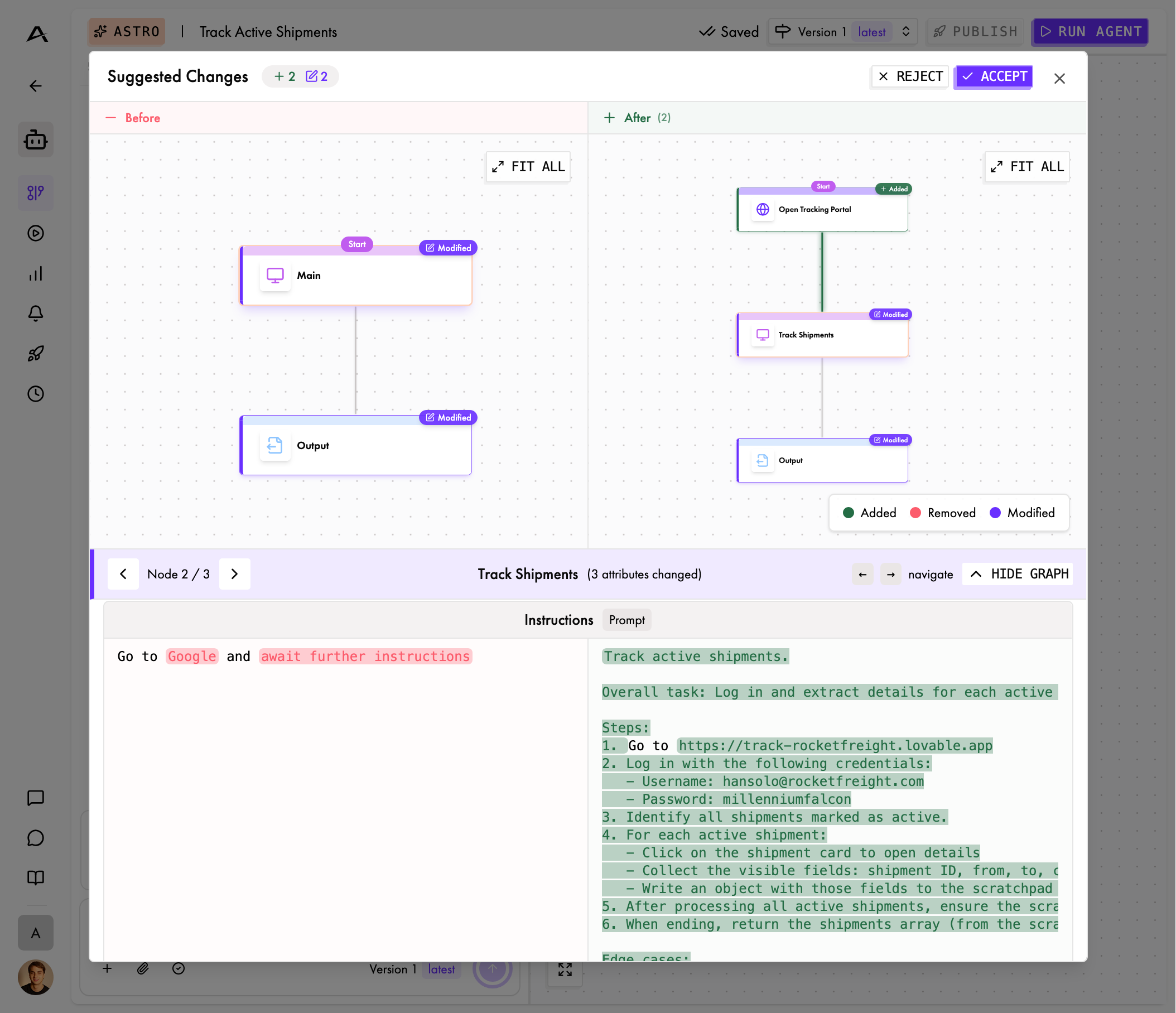
This is how non-technical users build confidence. They see exactly what’s happening, in language they understand. It’s code review, adapted for automation workflows.
Beyond Building: Debugging Executions
Browser automation is inherently iterative. Scripts break, pages change, edge cases emerge. So we gave Astro the @execution mention pattern, so that users can reference specific executions directly:
Why did @exec-7f3a2b fail?
Astro retrieves the execution details: its status, which nodes ran, message history, errors. Then it can drill into specifics: “Show me what happened in the Login node.” Armed with this knowledge, it explains the failure and suggests fixes based on what it finds:
The login succeeded, but the ‘Download Report’ button wasn’t found. The selector .btn-download may have changed. I’d suggest using a more robust selector like button:has-text(‘Download’), or adding a wait condition for the button to appear.
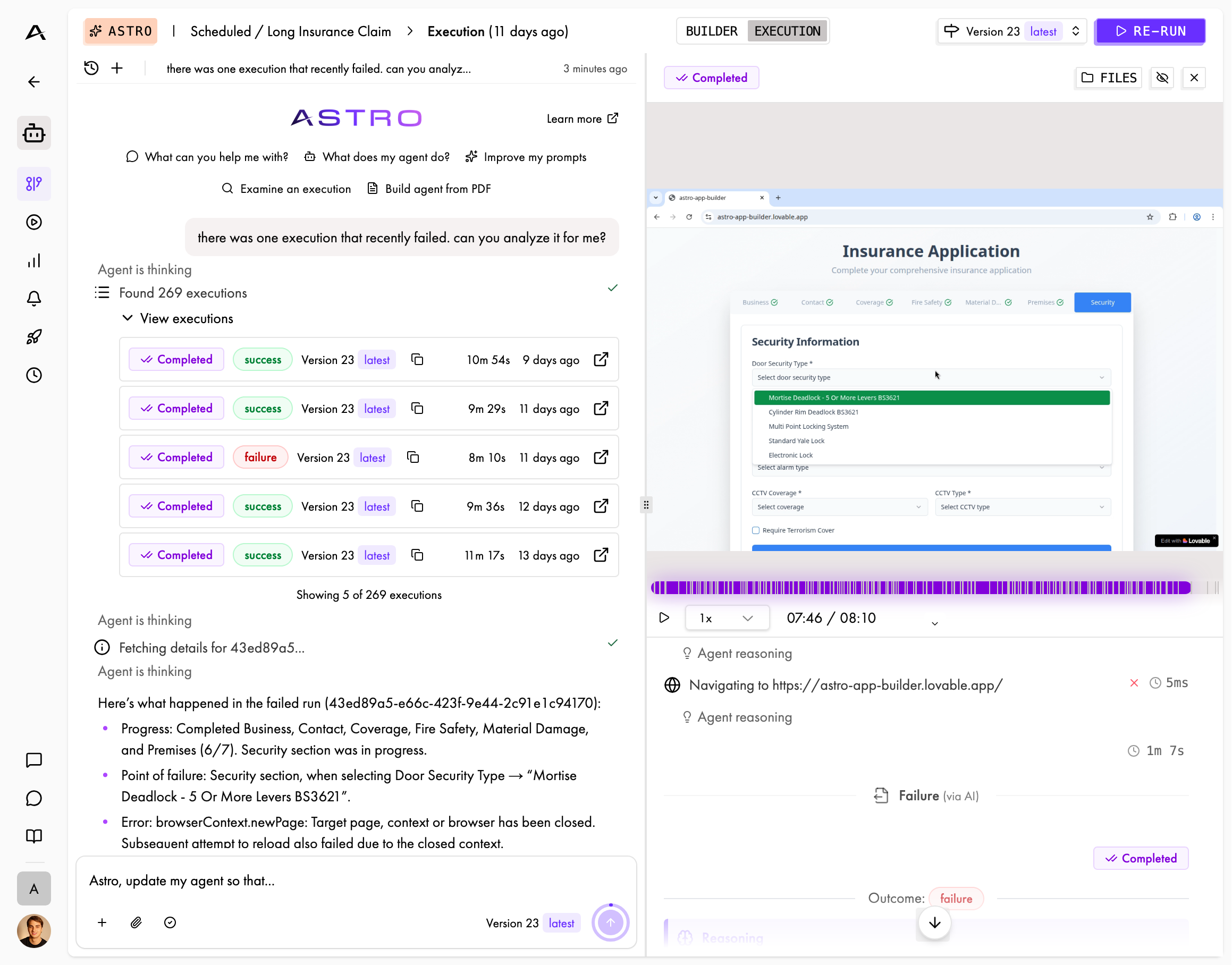
The connection between debugging and building is seamless. Astro can analyze a failure and immediately propose a fix: not just explain the problem, but update the workflow so that it won’t fail again.
Astro in Production
The real test of any tool is production use. Acolite, a company automating workflows for insurance agencies, had struggled with legacy insurance portals that broke traditional automation approaches:
We tried multiple browser automation approaches before Asteroid, and all of them hit a wall on legacy insurance systems. Maintenance was constant and progress was slow. With Asteroid, those same workflows just worked. The agents navigate complex, outdated portals reliably, and the fast iteration loop with Astro lets us improve workflows without burning engineering time.

This is exactly what we designed for: domain experts iterating quickly, without waiting on engineering resources. Astro handles the translation from intent to implementation.
What’s Next for Astro
Executions as Files
Currently, execution data comes through a tool call: compressed and returned as text. While this works in most cases, we’ve observed Astro occasionally struggle to truly grasp what happened during an automation run. That’s no surprise though: this breaks the file-based mental model Astro uses everywhere else. It has to switch from reading structured files to parsing long tool outputs. That’s why we’re moving to a representation like this:
executions/exec-7f3a2b/
 summary.md       → Overview, status, timing
 nodes/
   login.md       → What happened in this node
   download.md    → Success details
 errors.md        → Failure details if applicable
This aligns execution analysis with the same patterns Astro uses for editing. Read a file, understand the context, and propose changes.
Interactive Building
Right now, users describe what they want and Astro builds the graph. But we’re working toward something more collaborative: user and Astro working together on a live browser.
Imagine opening a browser session in Asteroid and narrating as you go: “First I click here, then I fill this form, then I wait for the confirmation…” Astro watches and translates the demonstration into a repeatable workflow. Users would rarely even need to think about “nodes” and “transitions”.
What We Learned
Building Astro taught us a lot of lessons. Most importantly, we found out we couldn’t just add AI to our graph editor: we had to replace the building flow with conversation.
That sounds like semantics, but it fundamentally changed the underlying interaction in our product: the graph is now output, not input. Users describe their intent, Astro produces structure. The technical artifacts (nodes, transitions, JSON schemas) still exist, but they’re becoming less and less what users manipulate directly. The graph editor is there for power users who want fine control, but for most people, most of the time, conversation is enough.
This only worked because we designed the tooling to match how the model thinks. When we gave it graph manipulation primitives, it struggled. When we gave it files, it thrived, not because files are inherently better for representing graphs, but because files match how LLMs have learned to reason about code. Same model, same capabilities, completely different outcomes based on how we shaped the interface.
Every layer of abstraction exists to keep the model in familiar territory and the user in theirs. Human-readable names instead of UUIDs. Semantic diffs instead of raw JSON. Validation that guides rather than blocks. This all shows that the collaboration surface matters as much as the model behind it.
That’s why Astro is Cursor for browser automation: natural language in, structured workflows out, with an AI that builds, debugs, and iterates alongside you.